There’s probably a bunch of permissions errors, filesystems warnings for cross-filesystem mounts or links, etc. all going to stderr. Linux output streams are a bit odd, 1 is stdout and 2 is stderr. So the command is redirecting the “noise” to null and just printing the actual command output. That would be my assessment, but OP could probably give a more correct answer…!


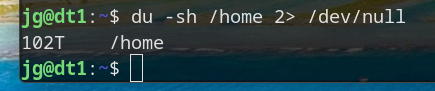
There’s probably a bunch of permissions errors, filesystems warnings for cross-filesystem mounts or links, etc. all going to stderr. Linux output streams are a bit odd, 1 is stdout and 2 is stderr. So the command is redirecting the “noise” to null and just printing the actual command output. That would be my assessment, but OP could probably give a more correct answer…!
Noob, just use sudo, less chars!
Oddly enough, still generates errors. (There are stuff in user directories that are set to 600… so even root can’t browse/open.)
There’s also some stuff in Proc and run that won’t let you.
Are you sure? Root can see everything.
On a network, it can’t.
NFS mount probably.
Well now I have to try this. Missing that executable bit would make sense. But last time I did this on / I didn’t get errors 🤔
Nope, you are exactly on.